Choosing digital LOTO software starts with understanding how your site manages hazardous energy. A platform therefore needs to support the people, procedures and equipment involved in each isolation, from the initial request through completion and controlled return to service.
That becomes more demanding when multiple contractors share systems, commissioning overlaps with construction, or maintenance continues across shifts.
However, a feature list alone will not show whether a system can handle those conditions. Instead, the most useful evaluation is a demonstration built around your own procedure, drawings and operating scenarios.
This guide explains what to assess in digital LOTO software, which questions to ask, and how to test a platform before committing to a wider rollout.
What makes an operation complex?
Complexity comes from the relationships between activities, equipment and people, rather than simply the size of the facility.
Examples include:
Several work groups depending on a shared isolation.
Equipment supplied by more than one energy source.
Construction continuing near systems undergoing commissioning.
Temporary configurations that change during testing.
Responsibilities transferring between contractors or shifts.
Different approval requirements across projects.
Engineering drawings changing as installation progresses.
Consider an illustrative commissioning project where one contractor requests equipment energization while another still has work associated with the same system.
In that case, the software evaluation should establish how that relationship is recorded, how it becomes visible to reviewers, and which approvals are required. It should also establish what the software cannot determine without competent field assessment.
For an introduction to the underlying workflow, read our guide to digital lockout tagout systems.
1. Check how digital LOTO software supports your approved procedure
To begin with, review your standard operating procedure, approval hierarchy and permit-to-work arrangements.
Ask the supplier to map one complete process into the proposed configuration. Include the people responsible for requesting, reviewing, executing and closing the activity.
In particular, check how the system handles:
Mandatory information and supporting documents.
Different approval routes for different activities.
Rejected requests and resubmissions.
Changes after approval.
Delegated authority and unavailable approvers.
Cancelled or suspended work.
Demonstration test: Change the work scope after approval. Ask the supplier to show which reviews must be repeated and how the previous decision remains traceable.
Overall, the objective is to make the approved process clear and executable. Equally, any proposed change to that process should receive the appropriate operational review.
2. Evaluate engineering drawings and revision control
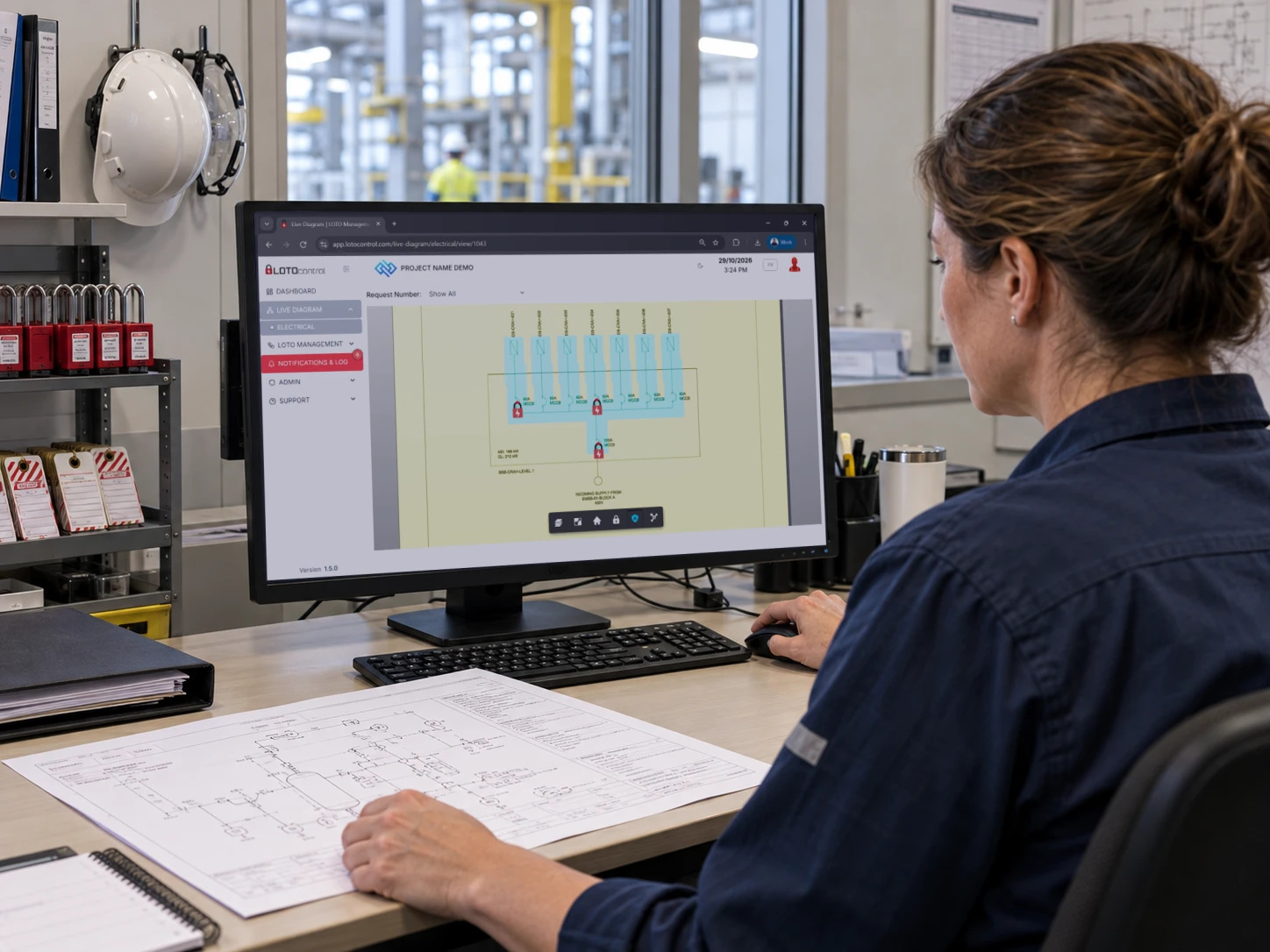
On a complex site, teams may use single-line diagrams and other engineering documents to understand equipment relationships.
Establish which drawing formats the software supports, how equipment is identified, and how isolation points are mapped.
Then examine what happens when a drawing changes.
Can the team distinguish the current revision from a superseded one? What happens to mapped points? Can a historical record still be understood in the context of the information used at the time?
Demonstration test: Replace a sample drawing with a revised version containing a changed equipment reference. Ask the supplier to show the update and review process.
A familiar diagram is useful only when its identification, mapping and revision status are reliable.
3. Understand dependency logic and status information
In fact, “live visibility” can describe several different things: recorded user confirmations, workflow progress, calculated relationships or connected-device data.
For this reason, ask the supplier to explain precisely what each display represents.
For dependency features, examine how the platform handles:
Demonstration test: Introduce an alternative supply into a sample scenario. Ask how the model is updated, who validates it and what users see before validation is complete.
In short, a diagram can support planning and coordination. However, it does not independently prove that equipment is free from hazardous energy.
4. Test commissioning and return-to-service scenarios
Commissioning involves changing system conditions. As a result, a workflow that suits a routine maintenance task may need additional configuration for staged testing and energization.
For example, use a scenario involving work completion, a proposed test and an outstanding activity elsewhere on the system.
Ask the supplier to demonstrate how reviewers identify related work and how the system records the decisions necessary for progression.
Also examine how it distinguishes:
Planned activities from authorized activities.
Recorded field completion from pending confirmation.
A request for energization from permission to energize.
Temporary testing arrangements from final handover.
Demonstration test: Leave a related work activity open, then submit an energization request. Observe what is blocked, what is flagged and what depends on reviewer judgment.
Finally, document those boundaries clearly.
5. Examine group work, contractors and shift handovers
In addition, assess the software against the way people actually participate in your energy control program.
Ask how individual responsibilities remain visible when several workers or contractors are involved. Test what happens when someone joins, leaves or transfers responsibility.
For covered U.S. work, OSHA 1910.147 includes provisions addressing outside personnel, group lockout/tagout and shift changes. Your configured workflow must therefore support the applicable arrangements without replacing required personal protection. See OSHA’s hazardous energy control standard.
Demonstration test: Run a shift handover while an activity remains open. Check what the incoming team can review, what it must acknowledge and how responsibility is recorded.
Include field personnel in this evaluation, because they are best placed to identify confusing or impractical steps.
6. Inspect the audit trail, including corrections
Above all, a report should help a reviewer understand what happened and how the record developed.
To this end, request a sample showing the work scope, equipment references, approvals, confirmations, timestamps and supporting evidence.
Then ask about corrections.
Can a user change a completed record? Who has that permission? Does the history preserve the original value, the revised value, the person responsible and the reason?
Demonstration test: Correct an equipment reference or supporting entry and export the record. Check whether the change remains understandable outside the application.
Also confirm retention periods, export formats and access to records after project completion.
7. Verify deployment, connectivity and integration
Cloud, dedicated hosting and on-premise arrangements create different responsibilities for access, maintenance and recovery.
For this reason, bring your IT team into the discussion early. Together with them, confirm:
Where information is stored.
How users and contractors authenticate.
How project access is restricted.
Who manages backups and recovery.
How updates are tested and scheduled.
Which functions require network access.
What happens during a service interruption.
Do not assume that mobile access means offline operation. Instead, ask what users can do without connectivity and how conflicting updates are handled after reconnection.
Likewise, for integrations, distinguish a working connector from an API that requires development. Identify the exact data exchanged, the authoritative system and the response to failed transfers.
Demonstration test: Ask the supplier to demonstrate a lost connection or failed integration and explain the approved recovery process.
8. Assess hardware requirements and administrative control
Connected locks, scanners and other devices may support particular workflows. However, evaluate them against a defined need.
Ask which hardware is mandatory, which is optional, and what maintenance, charging, replacement or network coverage it requires.
Also establish what your administrators can manage themselves:
At the same time, administrative independence should include controlled permissions, review and traceability.
Demonstration test: Have a trained administrator make a routine update. Record the steps, required approvals and any supplier assistance.
This provides a more useful measure of ongoing effort than a general promise of easy configuration.
Compare digital LOTO software suppliers using demonstrated evidence
Use a consistent scorecard after each demonstration.
| Evaluation area | Evidence to request |
|---|
| Procedure alignment | Your approval process demonstrated, including a scope change |
| Engineering information | A drawing revision and equipment-mapping review |
| Dependencies | A scenario involving an alternative supply or shared isolation |
| Commissioning | A proposed energization with related work still open |
| People and handovers | A contractor or shift-change scenario |
| Traceability | An exported record containing a documented correction |
| Availability | Demonstrated behavior during lost connectivity |
| Administration | A routine change completed by your administrator |
| Integration | A defined data exchange and failure-handling process |
Record each item as demonstrated, requires configuration, requires development or not supported.
Keep essential requirements separate from preferences. A high overall score should not conceal a missing capability that your approved process depends on.
Validate digital LOTO software through a focused pilot
Select a manageable equipment group or project area and agree the acceptance criteria before starting.
Include representative users from operations, field execution, commissioning, safety and administration.
Measure practical outcomes such as:
Time spent retrieving a completed isolation record.
Requests returned for missing information.
Time spent identifying the next responsible person.
Errors found in equipment mapping.
Difficulties completing field confirmations.
Effort required to maintain project information.
Test exceptions as well as routine requests. Record configuration gaps and resolve them before expanding the deployment.
In short, the pilot should establish whether the digital LOTO software fits your operation, what preparation it requires and which controls remain outside the platform.
Evaluating LOTOcontrol for your project
LOTOcontrol offers configurable approval workflows, interactive engineering diagrams and recorded action histories. Its published workflow includes isolation requests, guided execution, role-based review and visibility of recorded isolation status. Explore how LOTOcontrol works.
For a useful demonstration, bring:
Your approved LOTO procedure.
A representative drawing.
A sample equipment list.
Your approval roles.
One difficult handover or commissioning scenario.
However, deployment and integration requirements should be confirmed for your intended configuration. LOTOcontrol’s FAQs describe workflow customization, deployment options and its API-ready approach.
Frequently asked questions
What is the most important factor when choosing digital LOTO software?
Whether it supports your approved procedure under realistic operating conditions. Therefore, test routine activities, changes and exceptions using your own examples.
Can we use our existing engineering drawings?
Some platforms support uploaded drawings and mapped equipment. However, confirm supported formats, setup effort, revision handling and who can maintain the mapping. LOTOcontrol describes the use of client schematics in its diagram viewer.
Does digital LOTO software automatically identify every isolation point?
Do not assume it does. Instead, establish whether a feature recognizes drawing symbols, follows configured relationships or proposes isolation points. Each capability has different limitations and validation requirements.
Will the same configuration work across all sites?
A shared template can provide a starting point, but equipment, responsibilities, language and local requirements may differ. Therefore, define which elements are standardized and which require site-level review.
Does installing digital LOTO software make our program compliant?
No. Software can support administration and evidence. However, compliance depends on the applicable requirements and the implementation of the energy control program, including procedures, training and inspections.
Evaluate digital LOTO software using your own operation
The most useful demonstration shows how the platform handles the work your teams perform every day, including the situations that are difficult to coordinate.
Request a LOTOcontrol demonstration to review your procedure, drawings and project requirements with the team.